


Gemmy AI: Chat & Assistant
4.6603.00 Reviews
App Specs
- Version
- 4.5.8
- Updated On
- License
- Free
- Downloads
- 5,000,000+
- Developer
- Jetkite
- Categories
- Productivity
- Platform
- Android, iOS
Screenshots



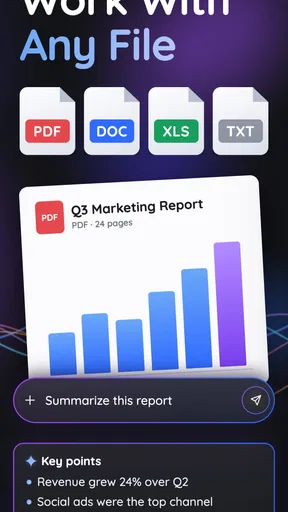
 Analysis by AppCompare
I find a chatbot most useful when it has a clear place in my day rather than becoming another app I open out of curiosity and then forget. Gemmy AI: Chat & Assistant is best approached as a flexible helper for small tasks: a place to ask a question, work through an idea, or turn a vague intention into a next step. It is a free productivity app from Jetkite, with optional in-app purchases ranging from $4.99 to $149.99 per item, so I’d decide what I want from it before considering any paid extras.
Start with a workflow, not a blank chat
Before opening Gemmy, I’d identify one recurring point of friction: perhaps I lose time figuring out how to word an email, break a large task into manageable parts, or remember the questions I need to ask at an appointment. A chatbot is easier to judge when it has a practical job. That small bit of preparation also makes it less tempting to treat every answer as something to follow without checking.
A useful test is to bring one real, low-stakes task and ask for an output you can act on. For example, if I have a busy afternoon, I might request a short sequence for sorting errands, then review it against opening hours, travel time, and my actual priorities. The value is not that the app knows my whole life; it is that it can help me get from a muddled thought to a draft plan. I still make the decisions.
Capture ideas, then give them somewhere to go
Chat can be a convenient first stop when an idea arrives at an inconvenient moment. I might ask Gemmy to help phrase a note to a colleague or turn a rough project thought into a few questions to investigate. The important follow-through is to move anything genuinely useful into the place where I already manage that work. A conversation is not automatically a dependable filing system, and I would not leave an important deadline buried in a chat and assume it will surface at the right time.
One practical habit is to ask for a compact result: a short checklist, a few headings, or a draft with clear next actions. Then I can copy the useful part into my calendar, notes, or task manager. This keeps the chatbot in a supporting role rather than making it the centre of my whole productivity setup. It also makes errors easier to spot: a concise suggestion is quicker to check than a long, polished answer that may hide a wrong assumption.
A repeatable routine beats constant chatting
I would use the app at predictable decision points instead of checking it throughout the day. In the morning, it could help me sort a loose list into “must do,” “if there’s time,” and “can wait.” Later, I could return with a specific obstacle, such as asking for a simpler explanation of a topic or requesting a first draft to edit. Ending each session by writing down the next action helps the conversation lead somewhere instead of expanding endlessly.
Here is a realistic use case: before leaving home, I realise I need to prepare for a meeting and pick up a few groceries, but I have not organised either. I can use a chat to outline meeting points and make a basic shopping checklist, then check both against my own notes and schedule. That is a modest but worthwhile assist. I would not ask it to make a time-sensitive commitment on my behalf unless I could verify the details and record the commitment in a system I already trust.
Worth Reading Before You Choose

EA SPORTS FC Mobile 26 Is a Bigger Football Game, but It Takes Time

Flipboard Shows What News Apps Must Do Beyond the Feed

Switching to Android Auto Means Rethinking Your Driving Routine

Google Calendar Makes a Crowded Week Easier to Manage

Ludo King Makes the Most of the Minutes Between Plans

Baby Panda World Brings Quick Play to Modern Phones, but Its Game Library Feels Busy
Where an AI assistant is the wrong tool
Gemmy’s flexibility is useful, but it does not remove the need to verify answers. A response can sound confident while misunderstanding a question, making a mistaken assumption, or offering a plan that does not fit the constraints I left out. I get better results by stating the goal, relevant limits, and desired format, then checking factual or consequential details elsewhere. For health, legal, financial, and safety decisions, I would treat a chatbot as a starting point for questions, not as a substitute for qualified advice.
I would also avoid putting sensitive personal or work information into a conversational tool unless I had reviewed its current privacy terms and was comfortable with them. That is a sensible boundary for any AI assistant, not a reason to assume anything specific about this app’s handling of data. If a task depends on confidential documents, exact records, or an audit trail, a purpose-built service with clearly suitable controls may be a better fit.
How it fits alongside familiar productivity tools
Compared with a conventional search engine, a chatbot can be more convenient when I need an explanation, a draft, or a few options shaped around the wording of my question. Search is usually the better route when I need to compare original sources, check current details, or see where a claim came from. I see these tools as complements: Gemmy can help me formulate what to look for, while direct sources help me confirm what is true.
It also differs from a dedicated calendar or task manager. Those tools are built around reliable dates, reminders, recurring events, and visible lists; a conversational assistant is more adaptable when the task is still fuzzy. If my main need is never missing an appointment, I would keep the calendar as the authority and use chat only to prepare. If my main need is getting unstuck on wording or planning, a flexible assistant may be more comfortable than a rigid form or template.
What is Gemmy AI All About?
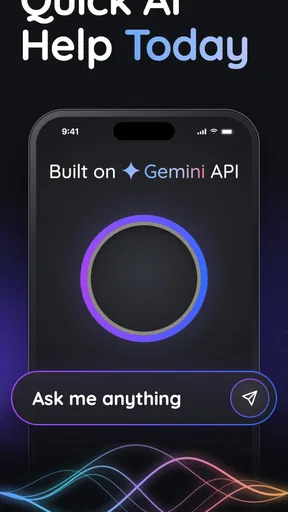
Gemmy AI: Chat & Assistant is designed to be your go-to app for anything you might need—a virtual assistant that’s equipped with AI capabilities to make your tasks easier and your days more productive. From setting reminders, managing your calendar, to even answering some of life's trickiest questions, Gemmy is here to be your right-hand app.
First Impressions
Installing Gemmy AI is a breeze. With an intuitive interface that doesn’t require a PhD to navigate, you’re ready to roll within minutes. The design is sleek with a minimalist touch, making it easy on the eyes. Plus, it's got a sense of humor! Yes, you read that right. Gemmy can be quite the comedian, throwing in a joke or two when you need a little pick-me-up.
Features that Stand Out
- Task Management: From creating to-do lists to setting reminders, Gemmy ensures you’re always on top of your game.
- Calendar Integration: Sync your schedules effortlessly and let Gemmy remind you of upcoming events.
- Information Lookup: Need some quick facts or answers? Gemmy is like your personal Google, minus the ads.
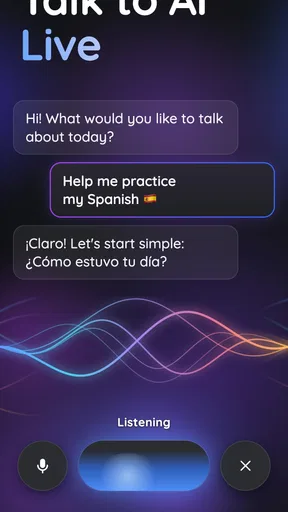
- Language Support: Chat in multiple languages, making it versatile for users around the globe.
- Friendly Conversations: Sometimes, all you need is a chat. Gemmy can engage in casual conversations, offering a human-like interaction.
Performance and Usability
The app runs smoothly without any noticeable lags, which is a crucial factor for any assistant app. Its ability to understand and respond to natural language input is impressive, making interactions feel quite seamless. I found that even complex queries were handled with relative ease, showcasing the robustness of its AI capabilities.
Getting the Most Out of Gemmy
To truly maximize what Gemmy AI offers, regular interaction is key. The more you use it, the better it understands your preferences and adapts to your needs. Whether you’re delegating tasks or just engaging in a friendly chat, Gemmy grows more efficient over time.
A Few Things to Keep in Mind
While Gemmy AI is a fantastic tool, it’s not without its quirks. Occasionally, it might misinterpret a query or give a response that’s a bit off the mark. But hey, no one’s perfect, right? Frequent updates and user feedback seem to be a priority for the developers, which is promising for ironing out these minor hiccups.
Its broad appeal is reflected in a 4.6 average from around 255,000 ratings, and it has passed five million installs. That visibility makes it easy to see why people try it, but popularity does not tell me whether it suits my habits. The app is rated for Everyone, is free to install, and its current version is 4.3.0. It was released on February 14, 2024, and requires Android 9 or later. I would check the purchase screen carefully before paying for anything, especially if I only need occasional help.
Who is likely to get the most from it?
I’d recommend trying it if you often need a first draft, a plain-language explanation, or help turning a broad goal into smaller steps. It is particularly handy for people who are comfortable checking an AI-generated answer and then moving the useful part into their own system. Someone learning a language may also appreciate being able to phrase questions conversationally, though I would still verify important translations when nuance matters.
It may be a poor match if you want a strictly structured project manager, a dependable source of current facts without checking, or a tool that automatically keeps every part of your schedule authoritative. People who dislike chat interfaces may also find that asking and refining questions takes longer than using a checklist or a well-organised notes app. The best reason to keep it is not that it replaces those tools, but that it makes certain thinking tasks less effortful.
Small habits that make answers more useful
When I ask for help, I get more practical responses by including the audience, purpose, and limits. “Help me write a message” leaves too much open; “draft a friendly, brief message asking to move a meeting, without giving a reason” gives the assistant a more useful target. I also ask it to separate assumptions from suggestions when the topic is complicated. That does not guarantee accuracy, but it gives me a clearer checklist for reviewing the result.
Another useful trade-off is choosing when not to continue a conversation. If I have refined a plan several times and it still does not fit, I stop and state the missing constraint in a fresh, direct request—or handle the decision myself. Chat can encourage endless polishing. For everyday productivity, a good-enough outline followed by a real next step is often more valuable than another round of wording.
There are also practical questions worth settling before making it part of a routine. Can it replace my calendar? I would not rely on it as the sole record of appointments; keep confirmed events in a calendar you already use. Is every answer ready to act on? No—check factual claims, dates, and recommendations, especially when the consequences matter. Do I need to pay to try it? It is free to install, while optional purchases are available, so I would begin with the tasks I can handle without spending and decide later whether any paid option is worthwhile.
For a lighter routine, I would use it to prepare and clarify, then let established tools handle storage and follow-through. A weekly review could be as simple as asking for help grouping a rough list, choosing the priorities myself, and transferring the final actions to my task manager. That division of labour reduces the risk of losing a useful idea inside a chat and avoids expecting an AI assistant to remember every commitment perfectly.
In conclusion, Gemmy AI: Chat & Assistant is a stellar app for anyone looking to streamline their daily routine while having a bit of fun along the way. It’s like having a personal assistant who’s always cheerful and never complains about overtime. Whether you’re a busy professional or someone who just loves technology, Gemmy is worth giving a shot. So, why not download it and see how it can fit into your life?
Pros
- Intuitive user interface enhances usability.
- Wide range of conversation topics available.
- Quick response time for user queries.
- Customizable settings for personalization.
- Supports multiple languages for global use.
Cons
- Occasional connectivity issues may arise.
- Limited offline functionality available.
- Some features locked behind a paywall.
- Voice recognition can be inaccurate.
- High battery consumption during use.
FAQs for Gemmy AI: Chat & Assistant
What is Gemmy AI: Chat & Assistant?
Gemmy AI: Chat & Assistant is an innovative application designed to offer users a seamless chat experience combined with a powerful virtual assistant. It integrates AI-driven features that facilitate real-time communication, task management, and personalized suggestions, making it a versatile tool for both personal and professional use.
Is Gemmy AI available on both Android and iOS platforms?
Yes, Gemmy AI: Chat & Assistant is available for download on both Android and iOS platforms. Users can easily find it on the Google Play Store and the Apple App Store, ensuring accessibility for a wide range of devices and operating systems.
What are the key features of Gemmy AI?
Gemmy AI offers a variety of features, including natural language processing for smooth conversations, task management tools, personalized recommendations, and integration with other apps and services. It also supports multiple languages, enhancing its usability for a global audience.
Are there any subscription fees or in-app purchases?
Gemmy AI offers a free version with basic features, but users can opt for a premium subscription to unlock advanced functionalities. These may include enhanced AI capabilities, additional customization options, and priority support. It's important to review the in-app purchase details before subscribing.
How does Gemmy AI handle user privacy and data security?
Gemmy AI prioritizes user privacy and data security by implementing strong encryption methods and adhering to stringent data protection policies. The app ensures that personal information is not shared with third parties without consent, providing users with a secure and trustworthy environment.


